

V3 Workflow Builder, editable Slack messages and thumbs up/down
Workflows
V3 Workflow builder launched — the old builder exposed its internals (step types, delivery modes, notification styles) as choices you had to make correctly before you could even describe what you wanted. We rebuilt it around what you're trying to do, not how it's stored.
- Built around what you're trying to do. Instead of picking a step type, you choose from what you're actually trying to do (Ask someone, Notify, Run an automation) and the builder figures out the mechanics.
- A real canvas. Workflows are now visual: drag to reorder steps and groups, see your whole flow at a glance instead of scrolling a flat list.
- Branching, brand new this week. An approval can now send your workflow down genuinely different paths depending on the outcome, visualized as separate lanes right on the canvas.
- Nothing to migrate. Every workflow you've already built keeps working exactly as it did.
Smarter Jira routing for Service Management — Admins can now route an escalated category to Jira as a Service Request with a specific Request Type, not just a plain Issue.
Analytics
Runbooks analytics — the Runbooks analytics tab shows a “live state” vs. an “event log”. Drill-down tables now show both the recipient's and the runbook assignee's name and start date.
Runbooks
- Personalization tags in microsites — the {{tag}} personalization tags you can already use in event messages (like {{first_name}}) now also work in microsite page descriptions.
- Custom sender name on runbook emails — set a name once in Email settings (e.g. “HR Benefits”) and it'll now show up as the sender on runbook and form emails too, not just replies.
Service Desk
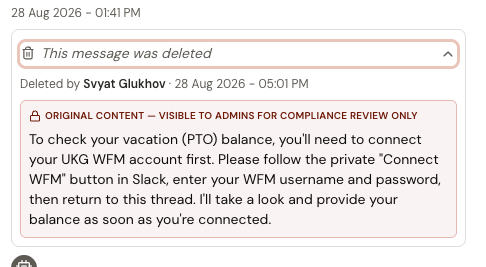
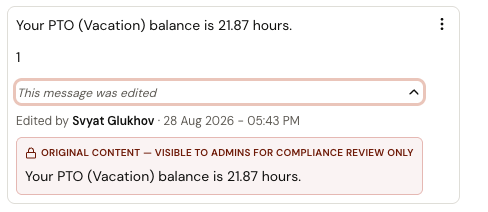
Edit and delete sent Slack/Teams messages — a menu now appears on hover/focus over any editable message bubble, with Edit and Delete. Edit happens in place; a successfully edited message gets an (edited) marker in both the back end and Slack. Delete asks for confirmation first. Each file attachment gets its own trash icon. No backfill: anything sent before this shipped is permanently un-editable/un-deletable. Email is out of scope; this only applies to Slack, Teams, and Local conversations.
Thumbs up/thumbs down officially live 👍👎 to give teams earlier indicators of conversations where the requester didn't get the expected response. A 👎 reaction will prompt escalation, and if the requester chooses not to escalate, the conversation pulls into the training centre as 'unresolved'. This replaces the 30-minute post-closure “Did I answer your question?” prompt.