- CategoryBlog
- Posted06.07.2026
- Time to read8mins
- AuthorOla Szaran
How AI-ready is your People Ops team? The four-stage framework, explained
Ask a People Ops leader whether their team is “doing AI” and almost everyone says yes.
Ask them where they stand in that journey, and whether they can measure the impact of “doing AI” so far, and the room goes quiet.
That gap between confidence and clarity is why Kinfolk built the People Ops AI Readiness assessment.
We’ve designed an 18-question assessment you can complete in about 2 minutes. And it will give you a map of where your People Ops function stands today, and a 90-day plan on what to prioritize next.
The pattern behind it showed up the same way, over and over, in conversations Kinfolk has had with People Ops leaders at breakfasts, webinars, and CHRO roundtables: people confident they were “doing AI,” unable to say exactly where they stood in the broader AI adoption picture, what good looks like, or where that maturity path leads.
This piece explains the framework powering the AI readiness test. It covers:
- What the assessment measures
- The four stages it places you on
- The six categories behind your score
- How to read your recommendations once you have them
Your team’s AI maturity isn't one score. It is six.
Most AI maturity frameworks treat readiness as a single score, a number: high, medium, or low. You might have a single stage, yes, but there are multiple components to your operation, and each one needs to show up in the report.
People Ops teams are rarely uniform, and we often see teams thriving in one area while still held back in another:
- One team might have a sharp AI strategy and a named executive sponsor, while running on a policy library nobody trusts.
- Another might have clean HRIS data and a strong knowledge base, but no relationship with IT that lets them act on it.
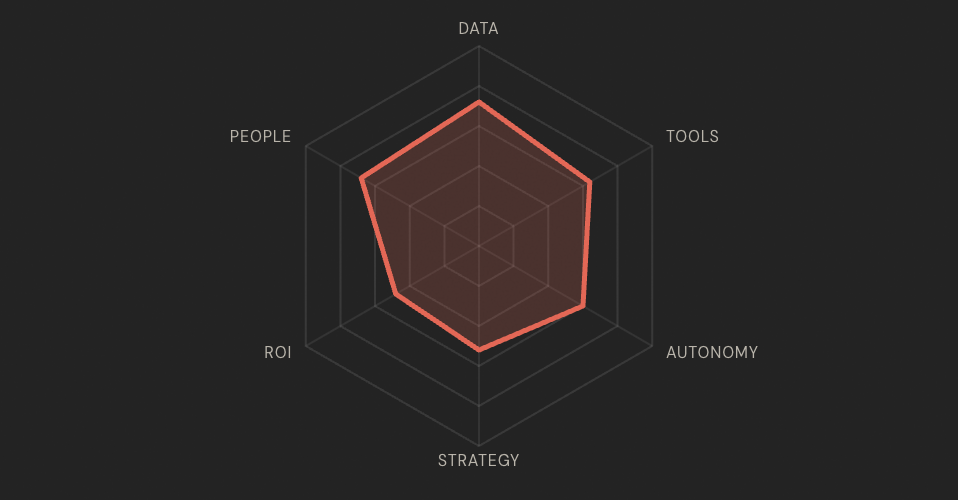
KINFOLK POV: a single readiness score hides the one piece of information that matters most, which stage you’re in, and which category is holding you back from the next one. Kinfolk’s model plots both: the four stages of adoption, Playground, Assistant, Teammate, Operator, and the shape you make across six categories that decide how fast you move between them. None of this is about whether someone on your team likes prompting Copilot or Claude for their own work. It’s about People Ops as a function: how well your team handles the requests coming in today, and how ready you are to put AI teammates alongside the people already doing that work.
How People Ops teams move through AI adoption
The stages describe a progression, and progression compounds. A team at AI Teammate still relies on the habits built at AI Assistant. Nobody skips a stage cleanly, and nobody has to abandon what worked at an earlier one to move to the next. The goal is to operate at the highest stage possible for a given use case, while still drawing on the earlier stages as you build new ones.
.png)
In live polls Kinfolk has run with People Ops leaders across two webinars, 60% said they were already using AI or agentic workflows in People Ops. The other 40% had not even started. That’s the whole reason a stage model beats a yes-or-no question: most teams sit somewhere in between, and very few can say exactly where.
The six things the AI readiness assessment measures
Each stage has its own radar shape, a picture of how far you’ve gotten across six categories of process strength and coordination.Together, those six categories show whether People Ops is ready to adopt AI as a team, not just whether one person on it is comfortable using an LLM.
- Data & Processes. Is your HRIS accurate and current? Are policies documented and easy to find? Are your highest-volume requests mapped as clear, repeatable processes? AI can’t act on information it can’t find or trust, so this is the category everything else depends on.
- Tools & Experimentation. Is your team already using AI tools day to day? Has that moved past asking questions into testing whether AI can complete real employee-support tasks?
- Autonomy & Alignment. Does People Ops have the standing to choose and roll out new tools with IT as a partner, not a gatekeeper? Teams that are strong everywhere else still stall here if every decision has to clear someone else’s queue first.
- AI Strategy. Is there a named owner, real executive backing, and a specific list of use cases, rather than general enthusiasm for the idea of AI?
- Business Case & ROI. Can you put a number on the volume of repetitive requests your team handles, and defend the return on an AI investment to a CFO or exec team?
- People & Change Readiness. Would employees use an AI assistant for HR support? Does your team understand its data-privacy and compliance position? Do you have real bandwidth to take this on in the next few months, not just interest in doing so?
KINFOLK POV: the category most teams underrate going in is Autonomy & Alignment. Data quality and executive interest get attention early. The working relationship with IT, who owns the decision, who approves the rollout, tends to surface only once a team is already trying to move and hits the friction.
Why your weakest category matters more than your average
A team that scores well across five categories but low on Data & Processes isn’t five-sixths ready.
Clean data and mapped processes are what let AI act on information reliably in the first place. A gap there caps what every other category can deliver.
The same logic applies to Autonomy & Alignment. A fully resourced business case doesn’t move anywhere if IT isn’t aligned to let the work start.
That’s why the recommendations are built by category, and by score band within each category, rather than as one generic list:
- Low on Business Case & ROI: the next step is counting request volume and putting a rough number in front of finance.
- High on Business Case & ROI: the next step is stress-testing the model’s assumptions and building a sensitivity case for what happens if results land lower than projected.
Same category. Different points in the work. Different action.
Putting the 90-day plan to work
The recommendations are grouped so the action matches where your team stands, not where you wish it stood.
Tools & Experimentation
- Just starting out: pick one low-risk, high-frequency task and run a structured four-week trial.
- Further along: build the internal playbook of your highest-impact use cases so the next hire gets up to speed fast, and start tracking time saved so you have data to defend further investment.
Data & Processes
- Just starting out: pick one place every policy lives, and delete the duplicates sitting elsewhere.
- Further along: set a recurring audit cadence with a named owner, so documentation stays trustworthy instead of drifting again.
People & Change Readiness
- Just starting out: talk to ten employees about how they currently get HR support, before buying anything.
- Further along: write the rollout plan, the employee communication, and the escalation path a real launch needs.
KINFOLK POV: the honest use of the plan is picking the one or two categories capping your stage, and working those, not trying to move all six at once. Scoring each category independently exists so you don’t spend a quarter polishing a category that was never the constraint holding you back.
Questions People Ops leaders ask before taking it
How long does it take?
Eighteen questions, split across the six categories, answered on a simple agree-or-disagree scale. Most people finish in about two minutes.
Do you need IT in the room?
No. It’s built for a People Ops leader to complete alone. IT involvement is one of the things the assessment measures, under Autonomy & Alignment, not something you need lined up first.
What if every category comes back low?
That’s an AI Playground result, and a normal starting point. Most people are still there, running team-wide Copilot rollouts or using Claude for personal productivity.
It’s the stage where you get to see what AI can and can’t do, and it’s a necessary step before you can bring AI teammates into the operation itself. The plan starts in one place: identify your highest-volume employee requests and map one process end to end, before evaluating any tool at all.
Does a high score mean the work is done?
It means the internal case is built. Most teams at AI Teammate or AI Operator find the constraint shifts from proving AI could work to executing a workflow reliably at scale, across HR, IT, and payroll systems that were never designed to talk to each other.
That’s a different problem than the one this assessment measures, and it’s usually the point where a team starts evaluating specialist platforms rather than building further in-house.
Where Kinfolk fits, stage by stage
Every team should start the same way: in the playground, building things with tools like Copilot or Claude to see what’s possible firsthand. Some teams get what they need there and stop.
Others want to move faster, or realize they can build a workflow but can’t maintain it. The governance, the security, the internal process around it is more than a small team can carry.
That’s the point where buying a purpose-built solution usually makes more sense than building your own: it comes down to speed, quality, and cost, and how much of that maintenance burden you want to own.
- AI Playground: a ticketing and visibility layer that helps you spot your highest-volume use cases, plus a sandbox to test the quality of your connectors, knowledge bases, and data structures before any live rollout.
- AI Assistant: answers repetitive employee questions directly inside Slack or Teams, like a chatbot, but one that also surfaces the insights and analytics that show you where the gaps are.
- AI Teammate: executes approved workflows end to end, while your team reviews and approves. This is where clients feel the value most directly: updating HRIS records directly from Slack, no logins required, and generating letters and templates instantly, work that used to take a three-person, eight-step process.
- AI Operator: AI runs behind the scenes like a people ops coordinator, starting processes on its own, handling full requests in Slack or Teams, and surfacing the data and insights that let you make strategic calls on service delivery and where the business goes next.
None of that matters until you’ve worked out where you stand today. That’s the entire point of the assessment: not a score to feel good or bad about, but a map of the one or two things worth fixing next, and a clear plan for what to do about them.
The assessment takes about two minutes. Take it here.